
GED-GEN
 

January 2012 marks the tenth anniversary of the first release of GED-GEN.  I am glad that so many people from all over the world continue to use the program.  Thank you to everyone who has tried it, and a special thank you to those who have registered their copy.

I plan to add more features.  But perhaps I should also remove some options left over from the early days of the Internet.  For one thing, I want to rely more on Cascading Style Sheets than explicit style attributes.

Continue reading »

 
Signature

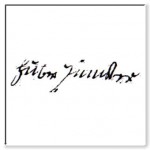
Hubert Yuncker 1828

It’s fun to use GED-GEN to add an individual’s portrait to their family group sheet. That’s fine if you have a photograph. How about adding images for ancestors who lived before photography even existed? For those folks, I like to add an image of their signature or their “mark.” Their signature is usually the only shred of personality they’ve left for us to see.  For example, see my family group sheet for Hubert and Barbe Yuncker.

Here are the steps to add an image of an ancestor’s signature in place of a portrait.  If your ancestor could not sign his or her name, they may have used a mark or symbol instead.

Continue reading »


MagnifierAre you looking for independent reviews of GED-GEN?  I will add links to reviews here as I come across them.

Annie Barnes kindly wrote about GED-GEN in her blog article Follow Friday: GED-GEN Review – GEDCOM to Web Pages from January 2011.


Most genealogy software programs do not adhere to all aspects of the GEDCOM standard.  One subtlety in the standard is the interpretation of “primary” genealogical facts.

When you export a GEDCOM file from your genealogy program, it may not specify primary facts properly.  If it doesn’t, your GED-GEN web pages may display secondary facts instead.

Continue reading »


A problem with GED-GEN was reported when using GEDCOM files downloaded from geni.com.  When you export a GEDCOM file from geni.com, the file may not include all required family records.

Continue reading »


After you set the options for multimedia galleries, you may find that GED-GEN still does not generate your gallery web pages.

The reason is, GED-GEN relies on a “scrapbook” flag that most genealogy programs use to determine whether a particular item is included in its scrapbook.

Continue reading »


Family Tree Maker 2011 appends “description” fields to event tag lines when you export a GEDCOM file.  This violates the GEDCOM standard.

Please download and install GED-GEN version 1.8.1 for a work-around to this situation.


Family Historian uses a nonstandard GEDCOM tag to identify multimedia files. It uses _FILE rather than FILE. To allow GED-GEN to recognize your multimedia files and create your gallery web pages, please enable the option “Process nonstandard tags.” This option is found in GED-GEN on the Program tab, under GEDCOM.


Please be aware of the following condition when you export a GEDCOM file using Family Historian version 4.1.3. An individual’s complete name is included in a NAME record as expected. However Family Historian apparently does not process certain optional parts of a name, like a separate given name and surname.

Continue reading »


While GED-GEN was being developed, RootsMagic changed the way it exports source citations to a GEDCOM file. The initial revisions of version 4.0 included source templates, but these have since been removed.

As of version 4.1.1.4, RootsMagic still does not export source citations properly, either with or without source templates. In GED-GEN, please choose the option for RootsMagic and not RootsMagic Templates. See the “Special Processing” option under GEDCOM on the Program tab.

GED-GEN removes empty space and extraneous punctuation in the source citations exported by RootsMagic. Your citations and bibliography entries may be worded strangely, but all the information is still present.